Category: Web development
Collapse all diff blocks in Github or GitLab
No, don't blame the user
It is unusual to see a computer engineer defending users. Even more if the engineer is a system administrator. It is known that the relationship between system administrators and users is tense. But when somebody tries to fool me, I get even more tense.
Let's go over the facts.
The registrar
I'm updating the administrative contact of some domain names registered with a well-known Spanish registrar. The company listed as the administrative contact no longer exists and now the domain names belong to another company, so I have to update all the data, but that's another story. Now I will transfer the domain to another registrar, so I only need to change the e-mail address to get the auth code to transfer the domain name to another registrar. I will correct the rest of the contact details at the new registrar.
I leave all data as is and just change the e-mail address, then I submit the form and it does nothing. It does not send the data, shows no message, no action, nothing. I try with different browsers and the result is always the same. Since I know a little bit about this, I go to the browser error console and this is what I found there:
Anyone can make a web page
The title of this post is ambiguous, since it can be interpreted as "making web pages is something easy for everyone" or as "even the most inept is allowed to make a web page".
This ambiguity is intentional, since experience has shown me that both interpretations are correct, in fact often the first implies the second.
'Cause although anyone can make a website, not everyone can make any web page. It is not the same to make a blog on Blogger than to develop the Facebook website.
Fighting Firefox password reminder
The situation is as follows: a website which, after logging in with a username and a password, allows you to register new users and a Mozilla Firefox user with the option to remember passwords enabled.
The case: the user adds a new account or logs in with an account and then edits this account from another account.
The problem: When the user is adding the new account Firefox will fill the fields with the user and password of the current account. When the user is editing an existing account Firefox will fill the fields with the username and password from the account being edited —which is also in the password reminder— if the user is not editing the account with the intent to change its password will not notice that only the first of the two fields "Password" and "Repeat password" is filled, so when the user tries to save it will display "Passwords don't match" error.
RapidShare premium download with Opera
I must blame Fonso again, because he asks me about something like FlashGot but for Opera in Linux, i.e., a way to be able to select a block of RapidShare URLs to download them with a premium account with a download manager. So when I didn't find anything, I started with it.
I finally got a bash script that receives a list of links as parameters and adds them to Aria with a RapidShare premium account. Using aria was not a choice, since it was the only one, apart from wget, that supports RapidShare premium accounts (i.e., HTTP authentication) without problems.
New Google Docs and Opera
Update: This workaround is no longer needed with Opera 9.50 which seems to solve this problem. Check your version and update if needed.
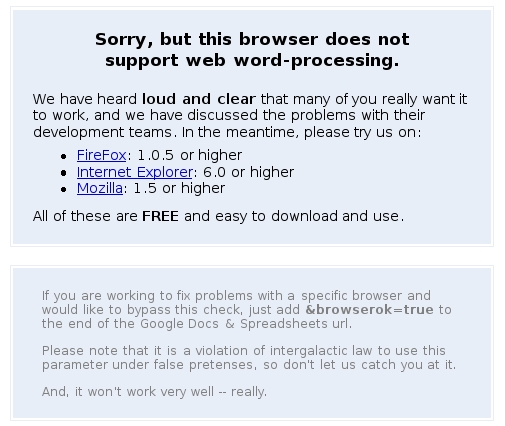
Google has recently developed a new Google Docs version and if you thought they took the chance to improve (at least a little) the compatibility with other browsers, you couldn't be more mistaken. Actually, it went worse with Opera.
If previously it was enough by adding ?browserok=true in order to enter Google Docs with Opera and mask it as Internet Explorer to use Spreadsheets, now it gets constantly reloading with Google Docs and Spreadsheets is only usable with a poor read-only interface (masking Opera as IE throws errors).
IE 8 doesn't pass Acid 2 test
The news spread on the specialized media: finally, almost two years later than the first browser doing it (which wasn't either iCab, Safari or Konqueror but Opera), Internet Explorer 8 will pass Acid 2 test. The title of the only proof offered by Microsoft (since the browser is not yet available) is conclusive: «Acid 2 test pass complete». The corresponding post on IEBlog doesn't either left any doubt: «IE8 now renders the "Acid2 Face" correctly».
Coming back
Those that usually visit my page (yes, there are such people) would notice that it had an irregular behavior being inaccessible the most of the time. It was due to two reasons:
The abusive frequency of the new search engine Cuill indexing web pages squeezing the bandwidth with 1,000 daily requests, most of them referring to inexistent URLs that seem to be randomly generated by the robot combining different URLs, until it gets my hosting server to block my web page because of exceeding the daily bandwidth.
Bypass Canalmail
If you usually visit community portals in the PHPNuke style and similar you may find that some webpages say that you need to register with Canalmail to be able to access to any section (for example, download links). Canalmail is a very annoying commercial mass mail service and since one of the webpages I usually visit now uses Canalmail I finally made this script with JavaScript that replaces intermediate Canalmail URLs by the effective URL avoiding registering with Canalmail.
Safari and MSIE on Linux
As soon as I knew about Safari for Windows I knew what I wanted to do: after being able to run Internet Explorer on Linux it's time to do the same with Safari.
It's not easy, but when you know what you have to do it isn't difficult. And if you see how it works on Windows:

you can't expect great things with Wine either
These are the steps needed to be able to run Safari on Linux using Wine.